


Categories
AIOver the past two years, most of my work with law firm marketing and BD leaders has shifted to AI. One of the most useful things I help firms build is an AI task force: a small group with a clear mission, defined authority, and 90 days to learn what works. I work with law firms of all sizes on this, and the structure changes with the firm. This post walks through the model, the 90-day timeline, and what I’ve learned setting up and running task forces for marketing and BD teams.
A quick note before we start: everything here is a starting point, not a prescription. A 40-person boutique and an Am Law 100 firm will not build the same thing. Your firm’s AI policy, IT security standards, and client outside counsel guidelines come first.
Adoption is not the problem
Most law firm marketing teams already use AI. That isn’t the issue. The issue is that adoption is not the same thing as adaptation.
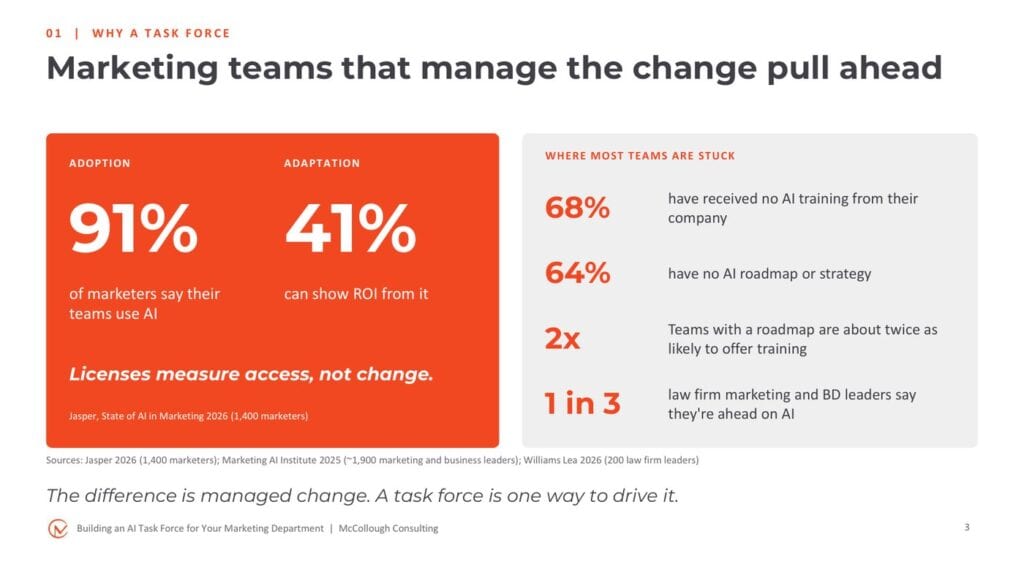
- 91% of marketers say they use AI, but only 41% can show ROI from it (Jasper, State of AI in Marketing 2026, 1,400 marketers).
- 68% have received no AI training from their company, and 64% have no AI roadmap or strategy (Marketing AI Institute, 2025 State of Marketing AI Report).
- Teams with a roadmap are roughly twice as likely to offer training (same report).
- Only one in three law firm marketing and BD leaders say they are ahead on AI (Williams Lea, The State of Legal Marketing 2026, 200 leaders).
Licenses measure access. They don’t measure change.
I heard the same theme all week at the MAICON conference this year, and I see it in my client work. Firms issue licenses, and IT runs a general training on how to start a chat, how to prompt, and how to create a project. That’s useful, but nothing in it is specific to marketing and BD use cases.
A licenses-only rollout stalls in predictable ways. BCG found that regular use among frontline employees has stalled at 51%, only one in three employees say they’ve been properly trained, and positive sentiment climbs from 15% to 55% when leaders strongly back the technology. The difference is managed change: leadership in the room, department-specific use cases, a roadmap, and someone who owns it. A task force is one way to drive that change.
What a task force does

Nobody needs another committee. The task force is a short-term mechanism. It’s not the goal. It’s a tool to get to the goal.
The payoff isn’t the task force. It’s better marketing decisions, better client insight, better business development, and better use of your people’s time.
Measure adaptation, not licenses
This is the comparison to take back to your CMO or marketing partner. License reports tell you people can use AI. They tell you nothing about change.
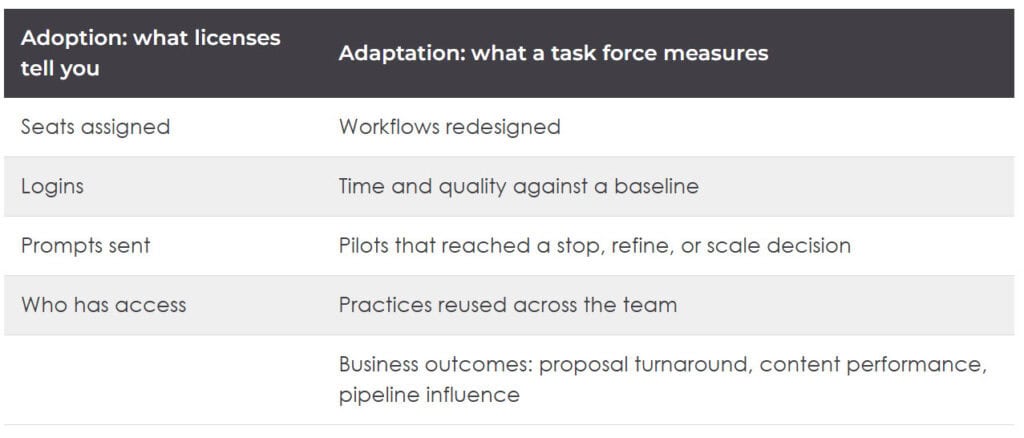
Bring leadership adaptation numbers, not license counts.
Right-size the model to your firm
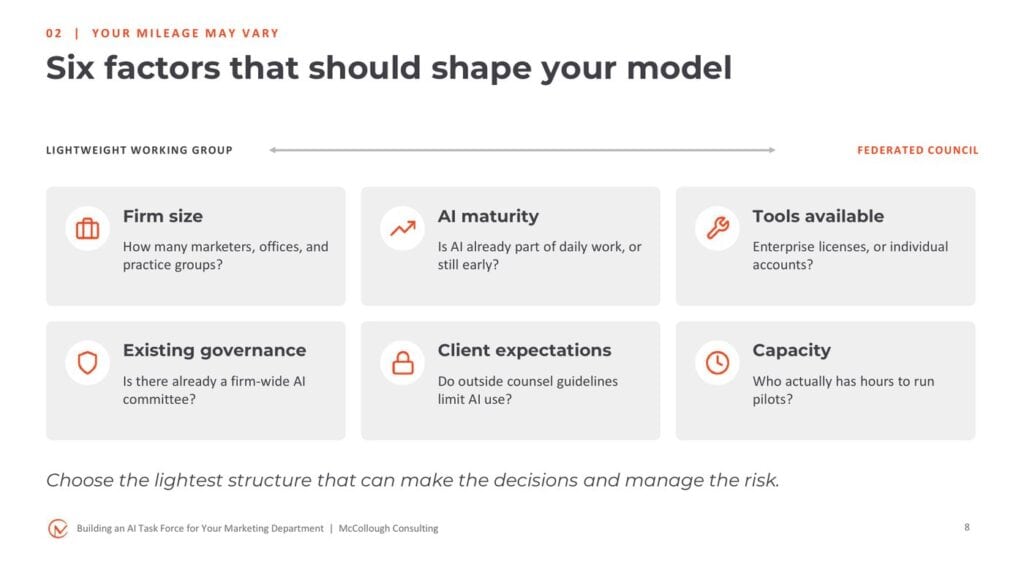
Six factors should shape your model. The more of them that point toward complexity, the more structure you’ll need.
Find out how your tools are actually deployed. Some firms allow shared projects with edit rights, others allow read-only sharing. Don’t assume your current setup matches your last firm’s.
If your firm already has an AI committee, marketing should have a seat on it. If it doesn’t, ask why. That committee is making decisions that affect your department.
You also don’t need connectors or MCP integrations to start. I’m still seeing firms, including Am Law 50 firms, get real time savings by downloading reports from Salesforce, Introhive, Foundation, or Bloomberg and uploading them by hand while IT and security take the time needed to review and approve connectors.
Don’t think that just because you don’t have LLM connectors, you can’t start a task force.
The rule of thumb: choose the lightest structure that can make the decisions and manage the risk. Here are two examples from opposite ends of the spectrum.

Build it for perspective, not attendance
The most common mistake I see is inviting everyone. When everyone is included, no one is empowered, and decisions keep getting pushed down the road.
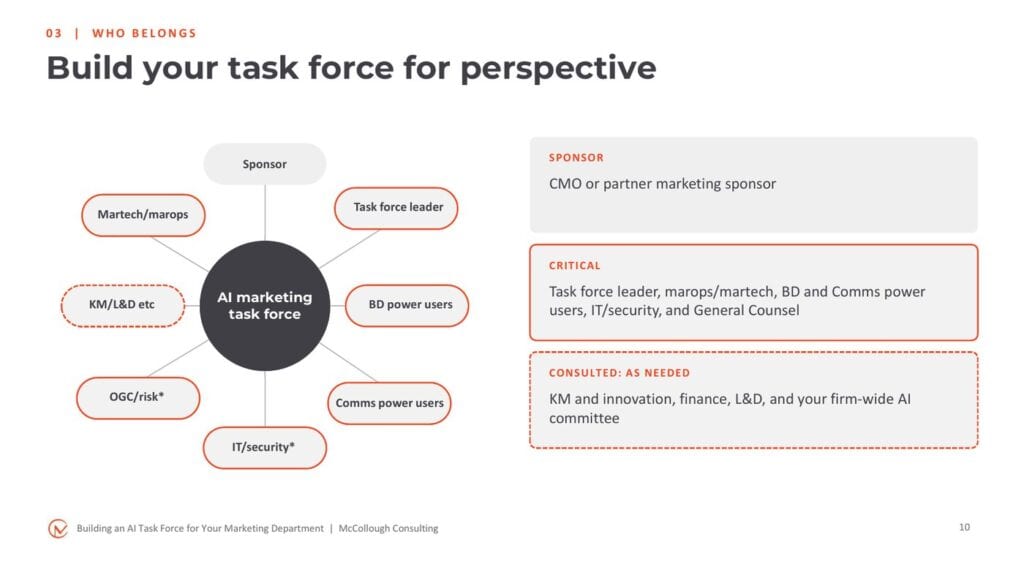
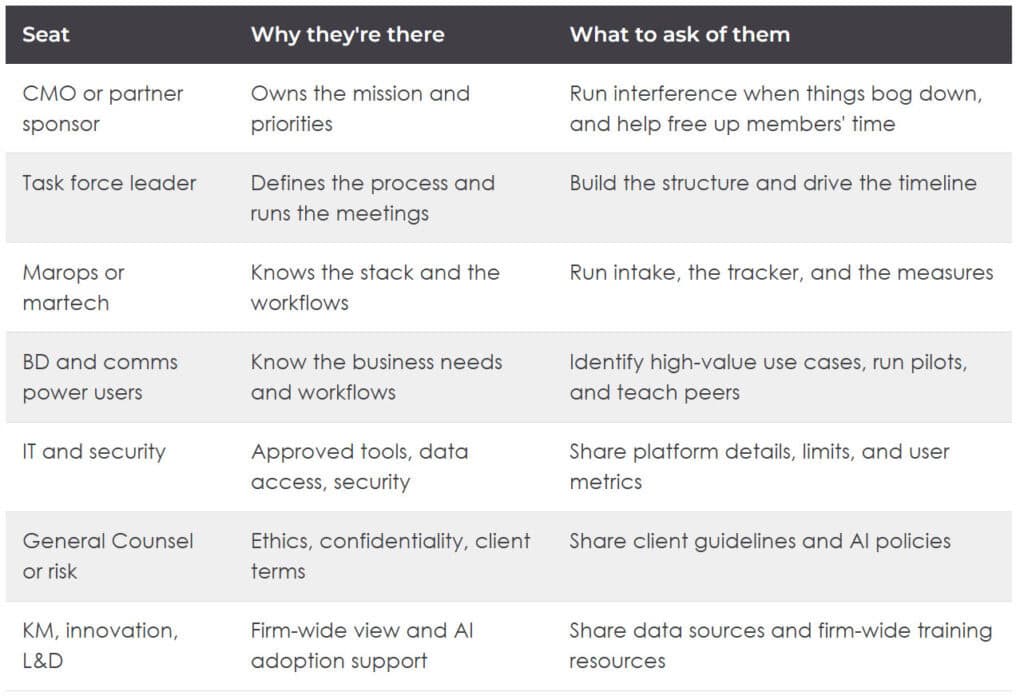
In larger firms, IT and the General Counsel’s office usually won’t send someone to a weekly meeting. The task force leader’s job is to meet with them early and bring the guardrails back to the group. In smaller firms, I often see them at the table. Either way, involve them from the start. Otherwise you’ll build a great pilot and then hear three reasons it can’t launch.
Bring consulted groups such as KM, finance, and L&D in when their topic is on the agenda. For example, once a use case is ready for wider rollout, you’ll need help with training videos and playbooks.
When you pick power users, look at attitude, not title. Some of the strongest contributors I’ve worked with have been creative services managers and assistants who came in with ideas for rethinking an entire event workflow.
Don’t think about titles. It’s about who is going to help you drive this task force. You’ll be surprised at who comes in.
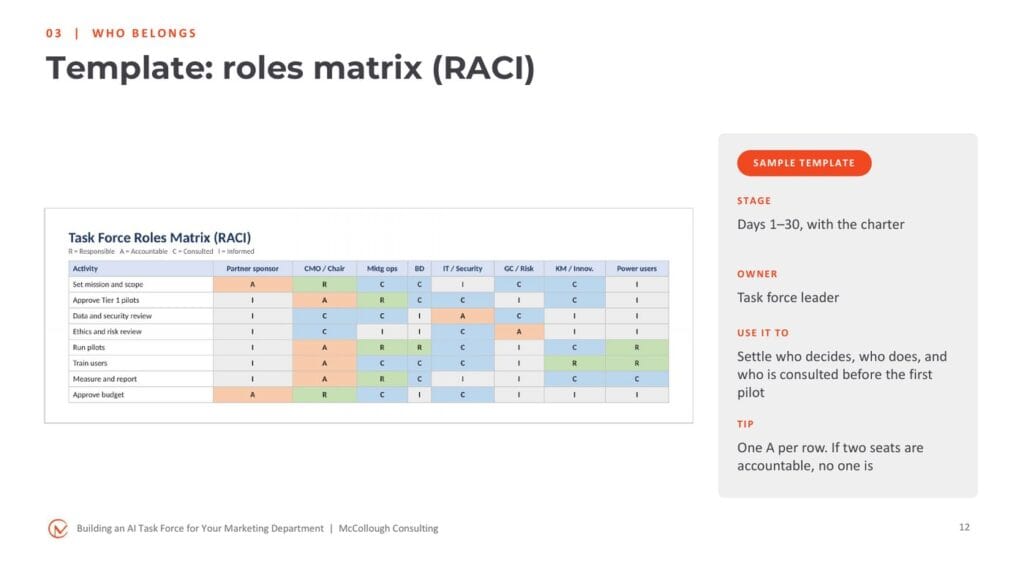
Settle the RACI at kickoff
Complete the roles matrix together at the kickoff meeting rather than handing it out. If someone doesn’t want to be accountable for a row, you want to know that up front. A CMO I worked with called it being draconian about your RACI: one A per row. If two seats are accountable, no one is.
Five decisions before you build anything
- Mission: why do we exist?
- Scope: what do we cover, and (equally important) what don’t we?
- Authority: what can we decide on our own?
- Membership: whose perspective is essential?
- Operating model: how will the work move, and how will we report status?
Start with outcomes, not the org chart. A task force without a business outcome is just another meeting.
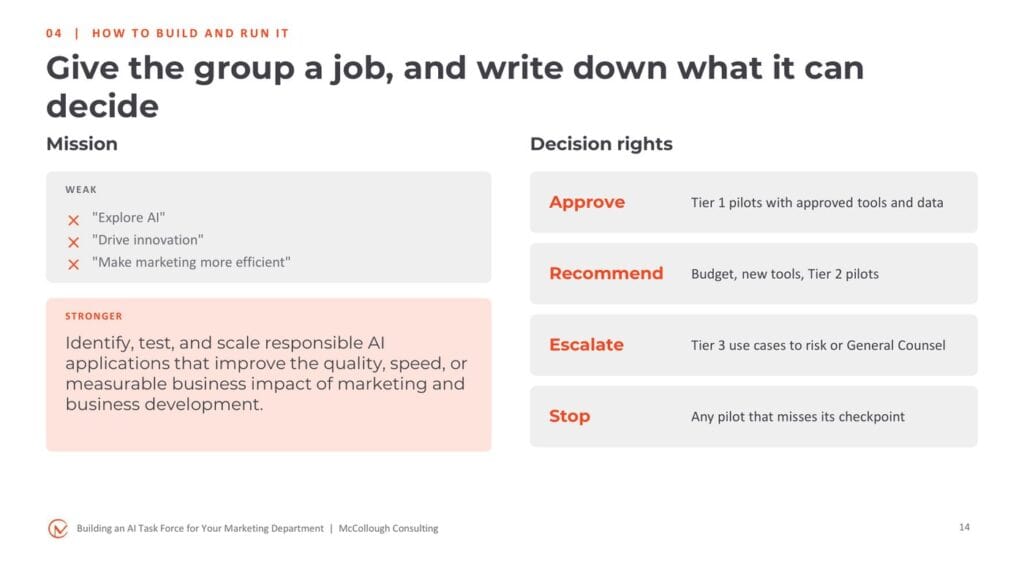
Put the mission, scope, decision rights, members, cadence, and Day 90 success measures on one page. Write the out-of-scope list first, because it prevents most of the arguments later. If your charter runs past two pages, you may be trying to do too much.
The 90-day timeline
A task force can’t be open-ended. In most firms I work with, 90 days is the right learning window.
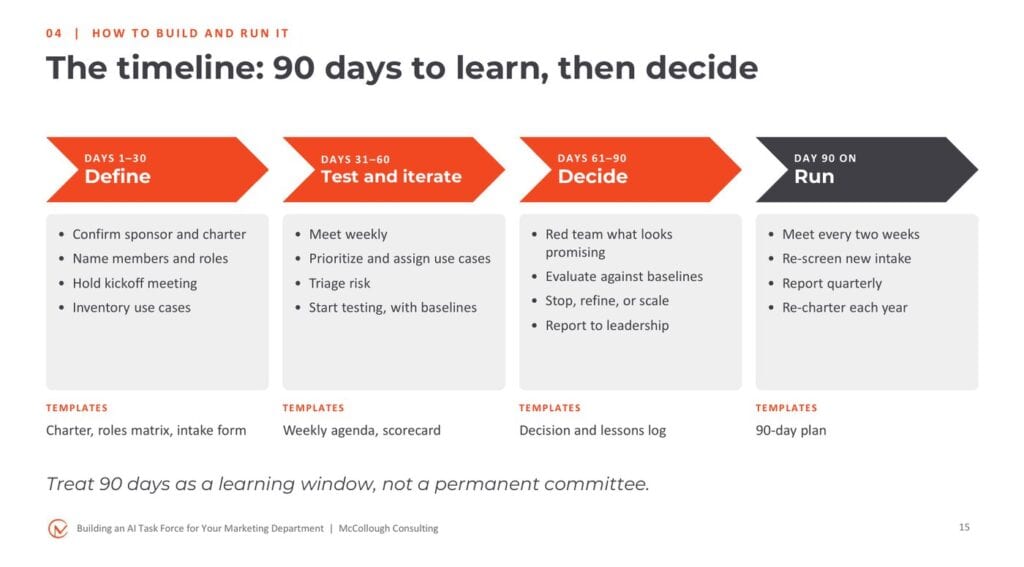
Review the plan at the top of every meeting, and move dates openly. Your CMO and your culture also need to be comfortable with failure. Some use cases that look perfect for AI won’t work, because the data isn’t connected or the tool is locked down. That’s part of discovery, not a black mark.
Quiet slippage is how task forces lose their credibility.
Days 1–30: Define
- Confirm the sponsor and charter
- Name members and roles
- Hold a kickoff meeting and complete the RACI together
- Open intake and inventory use cases
- Put meeting dates on calendars for the next three months
The kickoff doesn’t have to be closed. I’ve seen firms invite the whole marketing department just to see what’s coming. In larger departments, a short survey about tools, current work, and pain points helps people feel heard, even if they aren’t on the task force.
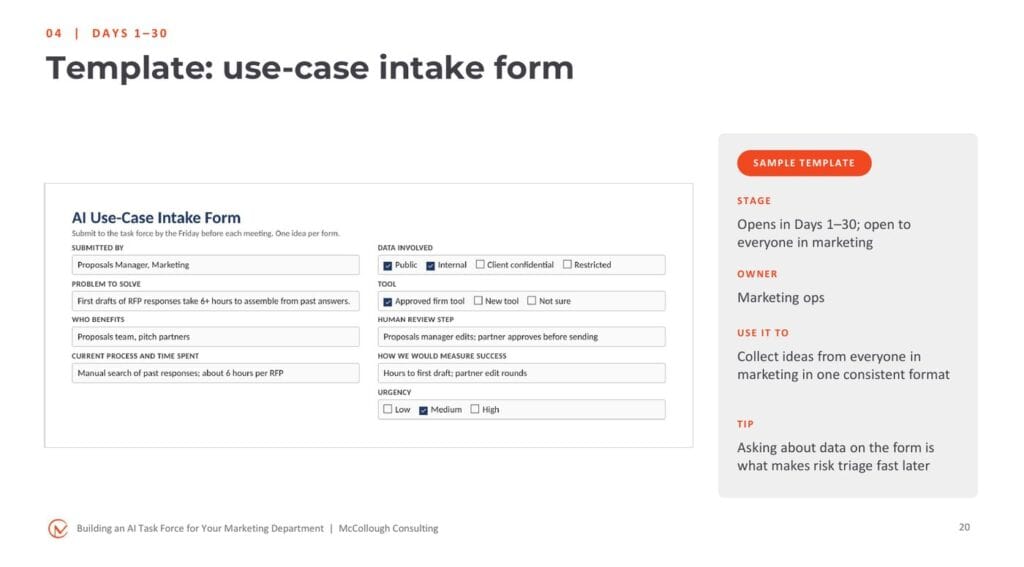
Open the intake form to everyone in marketing, not only power users. Some of the best ideas come from the people closest to the work. I typically use Smartsheet for intake and tracking, but Microsoft Forms feeding an Excel sheet works too. Asking about data on the form is what makes risk triage fast later. So does asking whether the output is internal or tied to a client or revenue.
Days 31–60: Test and iterate
Meet weekly. I’ve seen firms try every other week, and things start to lag.
Give someone two weeks to work on something, and they’ll wait until day 10 before they even think about it.
The first meeting is about priorities. One firm I’m working with received about 100 use-case ideas and narrowed them to six so they could dig in deeply. Thank the department for its submissions and tell them what happens next, so ideas don’t disappear into a void.
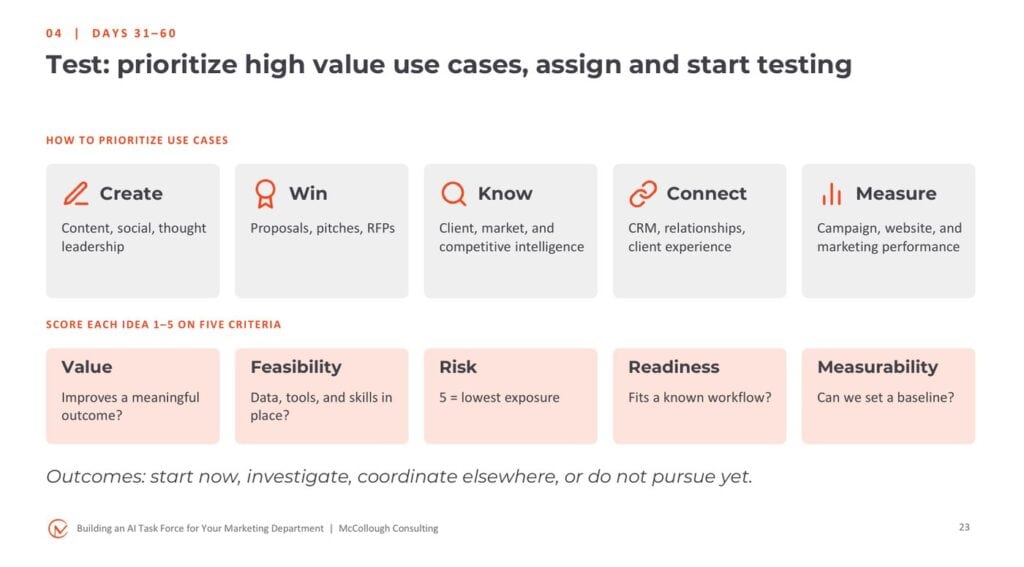
Sort ideas into five categories so you aren’t running five content pilots and nothing for proposals or client intelligence. Then score each idea 1–5 on value, feasibility, risk, readiness, and measurability.
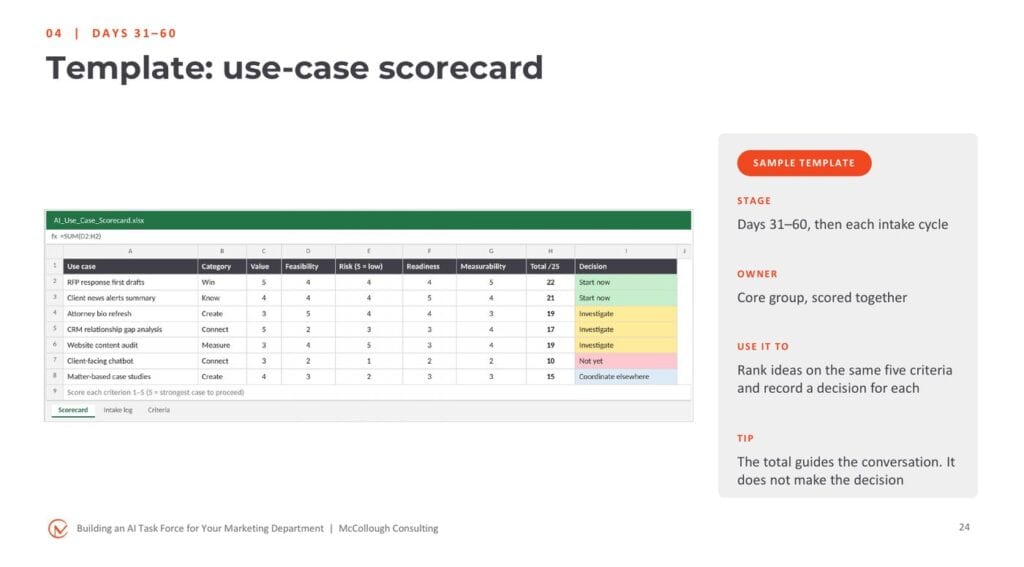
The scorecard gives you a neutral way to say not yet. The client-facing chatbot in this sample drew a lot of interest but scored low on feasibility and high on risk. When a partner asks about it, you have data to explain why it’s not on the list right now. The total guides the conversation. It doesn’t make the decision.
Assign an owner to each priority use case and run the same 45-minute agenda every week: wins and lessons, new intake, testing updates against baselines, decisions, and actions. Two rules help: no testing update without a number, and no side projects. The weekly meetings are also where shared needs surface, such as a core guideline for how to handle voice-of-the-client content across every use case.
Document the workflow before testing
Power users shouldn’t start with a prompt. They should start by writing down the workflow:
- Map today’s workflow: the steps, the people, the tools, and the time
- Capture the baseline: how long it takes now, and what good looks like
- Mark the AI steps: what AI does, what a person reviews, and what data goes in
- Build it: instructions, reference files, and test questions with the answers you expect
- Test and log: run approved examples, note what breaks, revise, and test again
If you can’t describe the workflow, you can’t test it, and you can’t teach it later.
Writing down expected answers matters. If you don’t know what you expected, you’ll accept whatever the tool gives you. Here is an illustrative example for a prospect research brief, with AI helping in three of five steps and people owning the question, the facts, the review, and the relationship with the attorney.
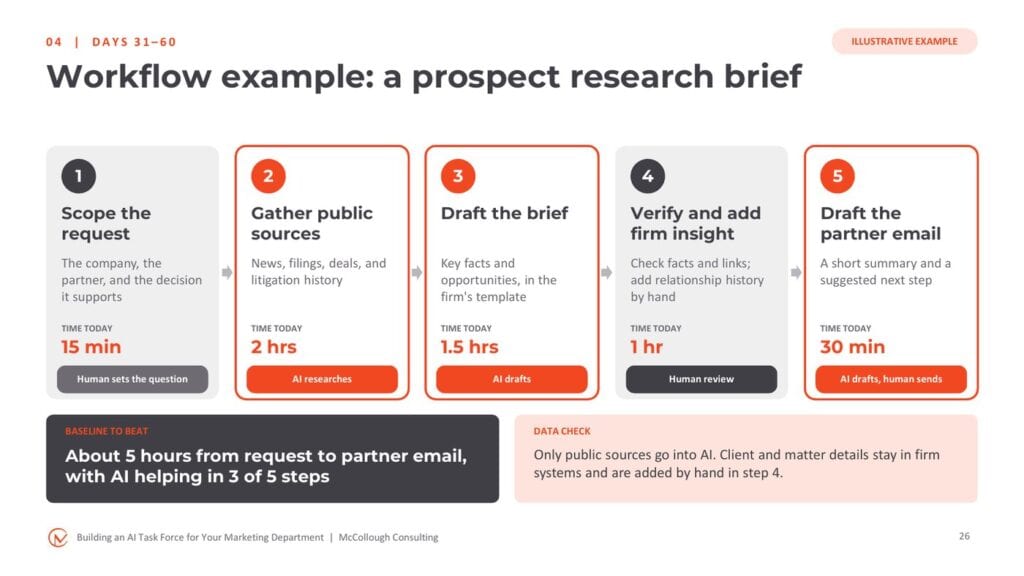
Iteration is where the light bulbs go on. Power users who say they use AI all the time often don’t see the snags until they work through a specific use case, such as a client-specific context file throwing off answers about clients in general.
Days 61–90: Decide
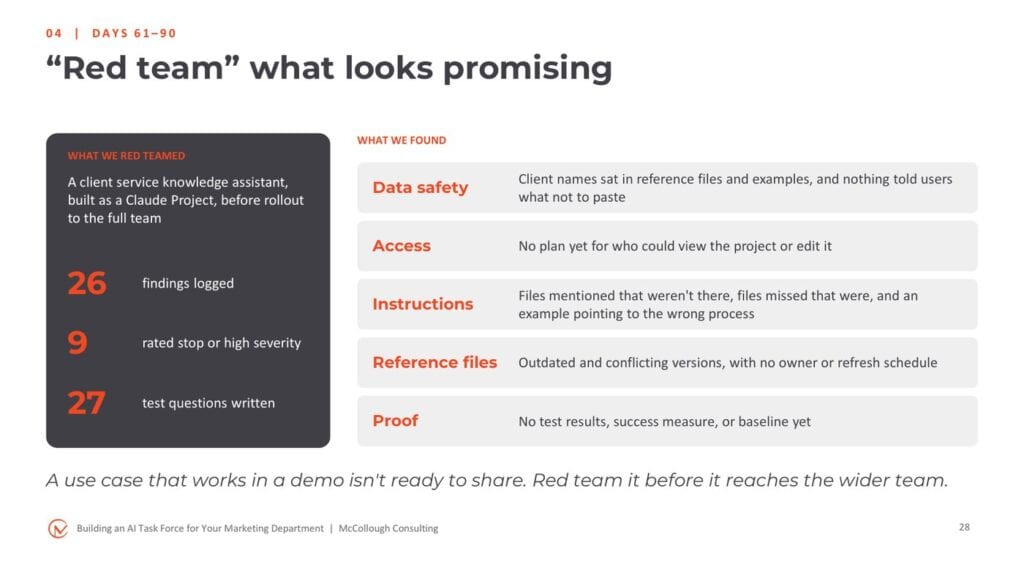
A use case that works in a demo isn’t ready to share. Red team what looks promising by handing it to someone who wasn’t part of the iteration and watching where they trip. When I red teamed a client service knowledge assistant for one firm, we logged 26 findings, 9 of them rated stop or high severity.
Then review results against the baseline, confirm the red team fixes are done, and decide: pilot what worked, refine what’s close, and stop the rest with a note on why. Pilot with one small team before rolling out to the department.
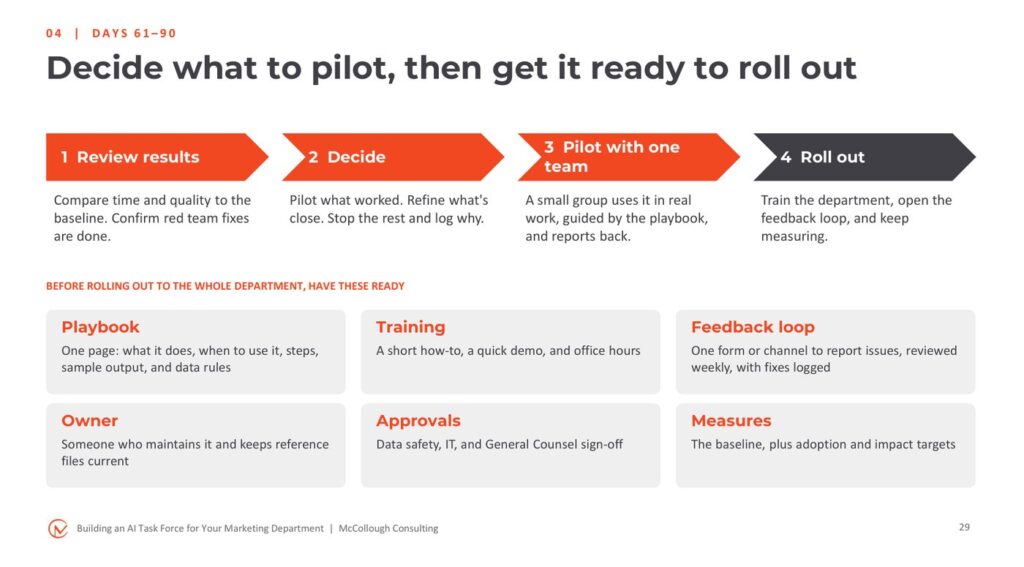
A two-minute screen recording from the power user who built the use case goes a long way. Make that person the go-to resource when people get stuck.
After Day 90, the work doesn’t end. If the task force worked for your firm, turn it into an ongoing AI champions group that meets every two weeks, re-screens new intake, reports quarterly, and re-charters each year. It’s less intense than the first 90 days, but the structure you built carries forward.
What usually goes wrong
- No clear business purpose
- Everyone is included; no one is empowered
- The group becomes a tool-review committee
- Pilots start without a baseline
- Governance appears only at final approval
- Lessons stay inside the pilot team
Most of these are prevented by a clear charter and an honest decision log.
Six ideas to take back to your firm
- Unmanaged AI experimentation won’t scale without structure and purpose
- Define the mission before the membership
- Right-size the model to your firm
- Put IT and legal in the room early
- Prioritize high-value use cases
- Measure business value, not activity alone
And three tips from the field:
- Don’t pick power users by job title. The right attitude means everything.
- Identify blockers early.
- Don’t let weeks slip by between meetings. If it’s not top of mind, momentum fades.
The goal is not an AI task force. The goal is better marketing, better client service, better business development, and better use of talent. Build the lightest structure that helps your firm learn, adapt, and create value.
The charter, roles matrix, intake form, scorecard, weekly agenda, and 90-day plan shown here are part of the toolkit I use with clients. If you’re thinking about implementing a task force for your marketing and BD team, let’s talk.
Research and references
- Jasper: State of AI in Marketing 2026
- Marketing AI Institute: 2025 State of Marketing AI Report
- Williams Lea: The State of Legal Marketing 2026
- BCG: AI at Work 2025, Momentum Builds but Gaps Remain
- Ahrefs: 69% of Marketers Are Publishing More AI Content Than Last Year
- NIST AI Risk Management Framework